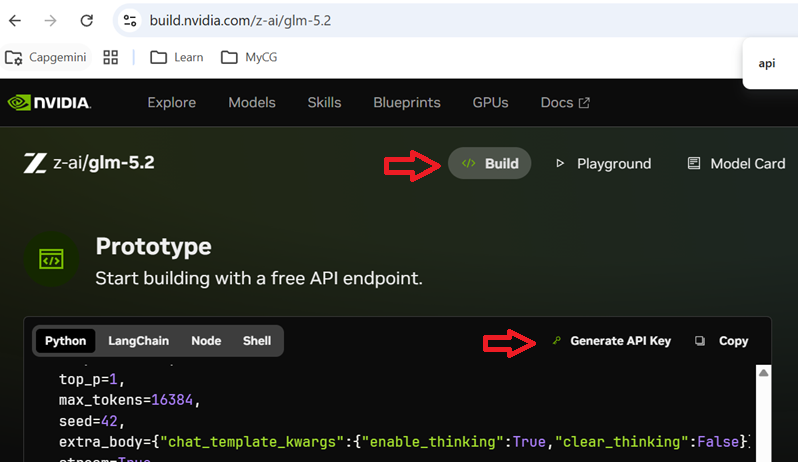
Step 1 – Get an NVIDIA API Key from build.nvidia.com
a. You will require a NVIDIA cloud account to be created and verified in order to generate an API key.
b. Browse the ‘Models’ and choose one. I will go with GLM-5.2 which is what first came up when I sorted using ‘recent’ filter.
Good part is, there is no credit card requirement, and most models (non-enterprise) are free for your learning and developing. It is worth noting down that the unlike other providers who use token consumption based billing, NVIDIA is different here.
You can find the ‘Generate API Key’ link (as of writing this blog) under Build tab on the model page.
STEP 2 – Write the program
I am going with OpenAI provider. You can use any framework of your choice. You can even get samples on OpenAI, LangChain, Node and Shell scripts in the model page itself.
from openai import OpenAI
client = OpenAI(
  base_url = "https://integrate.api.nvidia.com/v1",
  api_key = "YOUR-API-KEY"
)

resp = completion = client.chat.completions.create(
  model="z-ai/glm-5.2",
  messages=[{"content":"What is 1+4?","role":"user"}],
  max_tokens=4096
)

print(resp.choices[0].message.content)
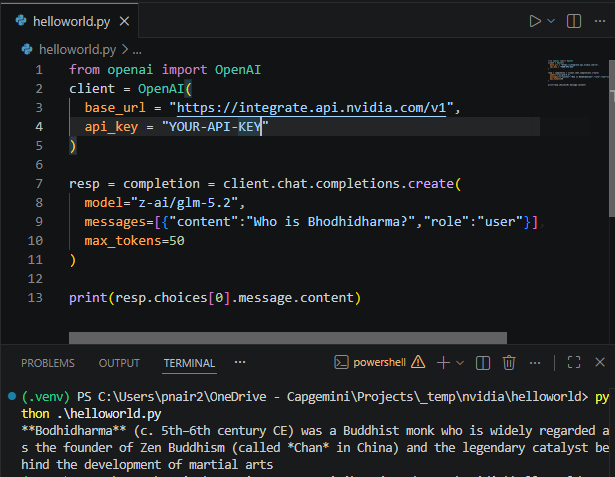
Output should look like this:
Bonus
Below is an example which uses streaming. While the above example keeps you wait till the model returns full response, which at times can be much delayed especially if you use a reasoning model with thinking enabled, below example will give you response in a chunking/steaming mode where the output response will be shown as soon as a chunk is available.
from openai import OpenAI
import sys

client = OpenAI(
  base_url = "https://integrate.api.nvidia.com/v1",
  api_key = "YOUR-API-KEY"
)

resp = completion = client.chat.completions.create(
  model="nvidia/nemotron-3-nano-omni-30b-a3b-reasoning",
  messages=[{"content":"Who is Bhodhidharma?","role":"user"}],
  max_tokens=4096,
  stream=True
)

for chunk in resp:
    content = chunk.choices[0].delta.content
    if content is not None:
        print(content, end="")
        sys.stdout.flush()