I’m hosting three sessions diving into the essentials of AI, LLMs, and Generative AI, RAG with a focus on the transformative potential of Agentic AI. I’ll also demo how to build AI agents using .NET and Python, blending theory with hands-on practice. Whether you’re a developer, tech leader, or AI enthusiast, these talks will equip you with the knowledge to leverage these cutting-edge tools.
I am excited to be a part of the “AI for Work-Life Balance: Helping Women Thrive in Agile Roles” event happening this Saturday, March 22, 2025, at KochiInfopark!
AI is transforming the way we work, and in agile environments, it plays a crucial role in enabling better work-life balance. I’m looking forward to joining a panel of inspiring leaders to explore how AI-driven solutions can empower women in tech and beyond.
If you’re passionate about AI, Agile, and fostering inclusivity in the workplace, don’t miss this event! See you there!
Since the launch of #DeepSeek, I have been evaluating different use cases across various domains and technology stacks. However, as of writing this post, I must say I am disappointed with its chat portal—though I am amazed by the R1 capabilities described in the paper.
Now, coming to a sample comparison with #ChatGPT GPT-4o—I am still impressed with OpenAI’s efficiency. My query was:
“Write a C# program in the most complex way possible to find the sum of two numbers.”
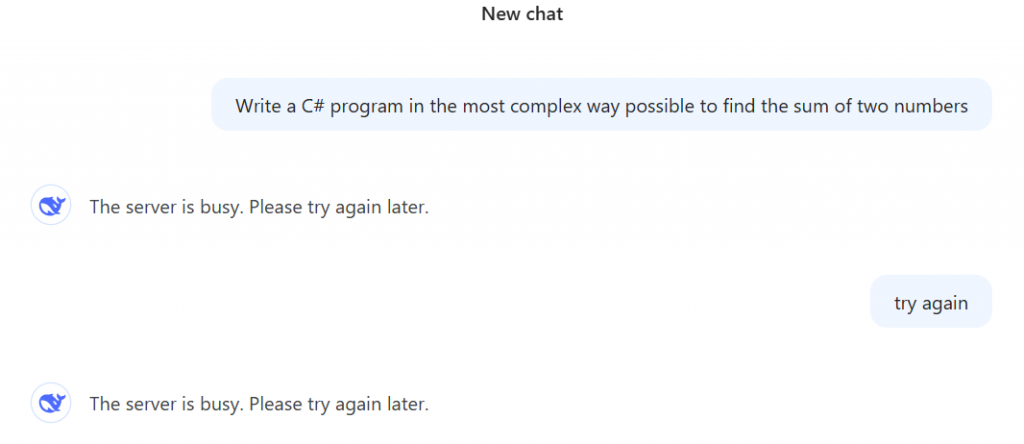
DeepSeek Chat, as has been the case recently, showed busy servers,
and after several attempts, I finally received a response in a slow, think-and-type manner. I understand this is a new system, so improvements will take time. However, it went a bit too far, generating a detailed program with additional explanations beyond what I asked for.
For the above question, DeepSeek used: Interfaces & Generics, Reflection, Delegates, LINQ, Async programming, and some error handling.
Yes, this is impressive.
using System;
using System.Linq;
using System.Reflection;
using System.Threading.Tasks;

namespace OverEngineeredSum
{
    public interface IMathOperation<T>
    {
        Task<T> ExecuteAsync(T a, T b);
    }

    public class SumOperation : IMathOperation<int>
    {
        public async Task<int> ExecuteAsync(int a, int b)
        {
            // Simulate some async work
            await Task.Delay(100);

            // Use LINQ for no reason
            var numbers = new[] { a, b };
            return numbers.Aggregate((x, y) => x + y);
        }
    }

    public class MathOperationFactory
    {
        public static IMathOperation<T> CreateOperation<T>()
        {
            // Use reflection to find the correct operation
            var operationType = Assembly.GetExecutingAssembly()
                .GetTypes()
                .FirstOrDefault(t => t.GetInterfaces()
                    .Any(i => i.IsGenericType && i.GetGenericTypeDefinition() == typeof(IMathOperation<>)));

            if (operationType == null)
                throw new InvalidOperationException("No math operation found.");

            return (IMathOperation<T>)Activator.CreateInstance(operationType);
        }
    }

    public delegate Task<int> SumDelegate(int a, int b);

    public static class Program
    {
        public static async Task Main(string[] args)
        {
            // Use a delegate for no reason
            SumDelegate sumDelegate = async (a, b) =>
            {
                var operation = MathOperationFactory.CreateOperation<int>();
                return await operation.ExecuteAsync(a, b);
            };

            // Use a complex way to parse input
            int num1 = int.Parse(Console.ReadLine() ?? throw new InvalidOperationException("Input cannot be null."));
            int num2 = int.Parse(Console.ReadLine() ?? throw new InvalidOperationException("Input cannot be null."));

            // Use async/await for no reason
            int result = await sumDelegate(num1, num2);

            Console.WriteLine($"The sum of {num1} and {num2} is: {result}");
        }
    }
}
But, ChatGPT went one step further:
It not only provided a more complex code than DeepSeek but also explained the complex, efficiently educating me the strategy. I liked the way they used design patterns.
using System;
using System.Linq;
using System.Linq.Expressions;
using System.Reflection;
using System.Threading;
using System.Threading.Tasks;

// Define an interface for operations
public interface IOperation
{
    int Execute();
}

// Abstract class providing base functionality
public abstract class OperationBase : IOperation
{
    protected int _a, _b;
    public OperationBase(int a, int b) { _a = a; _b = b; }
    public abstract int Execute();
}

// Concrete class for sum operation
public class SumOperation : OperationBase
{
    public SumOperation(int a, int b) : base(a, b) { }

    public override int Execute()
    {
        return _a + _b;
    }
}

// Factory for creating operations
public static class OperationFactory
{
    public static IOperation CreateOperation(string type, int a, int b)
    {
        if (type == "sum")
            return new SumOperation(a, b);

        throw new InvalidOperationException("Unknown operation type");
    }
}

// Delegate to notify completion
public delegate void SumCompletedHandler(int result);

// Calculator using events and delegates
public class ComplexCalculator
{
    public event SumCompletedHandler SumCompleted;

    public void ComputeSumAsync(int a, int b)
    {
        Task.Run(() =>
        {
            var operation = OperationFactory.CreateOperation("sum", a, b);
            int result = operation.Execute();

            // Invoke event
            SumCompleted?.Invoke(result);
        });
    }
}

// Reflection-based executor
public static class ReflectionExecutor
{
    public static int InvokeSumOperation(int a, int b)
    {
        Type type = typeof(SumOperation);
        ConstructorInfo ctor = type.GetConstructor(new Type[] { typeof(int), typeof(int) });
        object instance = ctor.Invoke(new object[] { a, b });

        MethodInfo executeMethod = type.GetMethod("Execute");
        return (int)executeMethod.Invoke(instance, null);
    }
}

// Expression tree to generate sum dynamically
public static class DynamicSumGenerator
{
    public static Func<int, int, int> GenerateSumFunction()
    {
        ParameterExpression paramA = Expression.Parameter(typeof(int), "a");
        ParameterExpression paramB = Expression.Parameter(typeof(int), "b");
        BinaryExpression sumExpression = Expression.Add(paramA, paramB);

        return Expression.Lambda<Func<int, int, int>>(sumExpression, paramA, paramB).Compile();
    }
}

// Entry Point
class Program
{
    static void Main()
    {
        int a = 5, b = 7;

        // 1. Factory-based operation execution
        IOperation operation = OperationFactory.CreateOperation("sum", a, b);
        Console.WriteLine("Factory Method Sum: " + operation.Execute());

        // 2. Using reflection to invoke the sum
        Console.WriteLine("Reflection-based Sum: " + ReflectionExecutor.InvokeSumOperation(a, b));

        // 3. Using expression tree
        var sumFunc = DynamicSumGenerator.GenerateSumFunction();
        Console.WriteLine("Expression Tree Sum: " + sumFunc(a, b));

        // 4. Multi-threaded computation using event
        ComplexCalculator calculator = new ComplexCalculator();
        calculator.SumCompleted += (result) => Console.WriteLine("Async Sum Completed: " + result);
        calculator.ComputeSumAsync(a, b);

        // Keep main thread alive to see async result
        Thread.Sleep(1000);
    }
}
Breakdown of Complexity:
✅ Factory Pattern: Creates a sum operation dynamically. ✅ Abstract Classes & Interfaces: Adds unnecessary layers of abstraction. ✅ Reflection: Creates an instance of SumOperation and invokes Execute method dynamically. ✅ Expression Trees: Generates the addition function at runtime. ✅ Multi-threading: Runs sum computation asynchronously using Task. ✅ Event Handling: Notifies sum completion via a delegate. ✅ Manual Dependency Injection: Factory handles object creation.
Here is the ChatGPT script – https://chatgpt.com/share/6799e106-bd84-8000-8753-e68a7430fbfe. Unfortunately DeepSeek yet to give a direct chat link feature.
Solutions are always tailored to specific problems. There’s no one-size-fits-all approach. The techniques vary depending on needs like the level of customization, available data sources, and system complexity. The strategy should be based on these factors. Here are a few alternative approaches we can consider, if RAG is optional:
Embedding-Based Search with Pretrained Models: This is a relatively easy approach to implement, but it doesn’t offer the same capabilities as RAG. It works well when simple retrieval is enough and there’s no need for complex reasoning.
– Knowledge Graphs with AI Integration: Best for situations where structured reasoning and relationships are key. It requires manual effort and can be tricky to integrate, but it offers powerful semantic search capabilities and supports reasoning tasks.
– Fine-Tuned Language Models: This is ideal for stable, well-defined datasets where real-time data isn’t crucial. Since the data is straightforward, generating responses is easier. It performs well when the data is comprehensive but may struggle with queries outside the trained data.
– Hybrid Models: A mix of retrieval and in-context learning. While it’s a bit more complex to implement, it delivers high accuracy and flexibility because it combines different techniques. Use this when you need high accuracy and rich content.
– Multi-Modal Models: These models handle different types of data (eg., images, text) and provide combined insights. For example, they can retrieve images from documents and analyze them. However, they require solid infrastructure, which can get expensive.
– Rule-Based Systems: These expert systems rely on predefined rules to generate responses. They’re great for regulated industries like finance & legal, as they offer transparency and auditability. However, they’re typically not scalable and may not handle unstructured data effectively.
– End-to-End Neural Networks (for Q&A): These models are trained specifically for question-answering tasks. They perform well for defined tasks like Q&A and give concise answers without the need for complex pipelines. But they require large, annotated datasets and may underperform if there isn’t enough related data.
Since this field is still evolving, it’s important to stay on the lookout for new or improved techniques based on the specific requirements
Technically, I am not a fan of this but tired of laughing without facial expressions throughout my career, especially when talking to sales teams. Thanks to ChatGPT, here is the most abused jargons.
With this article, the issues and solutions I am trying to address are:
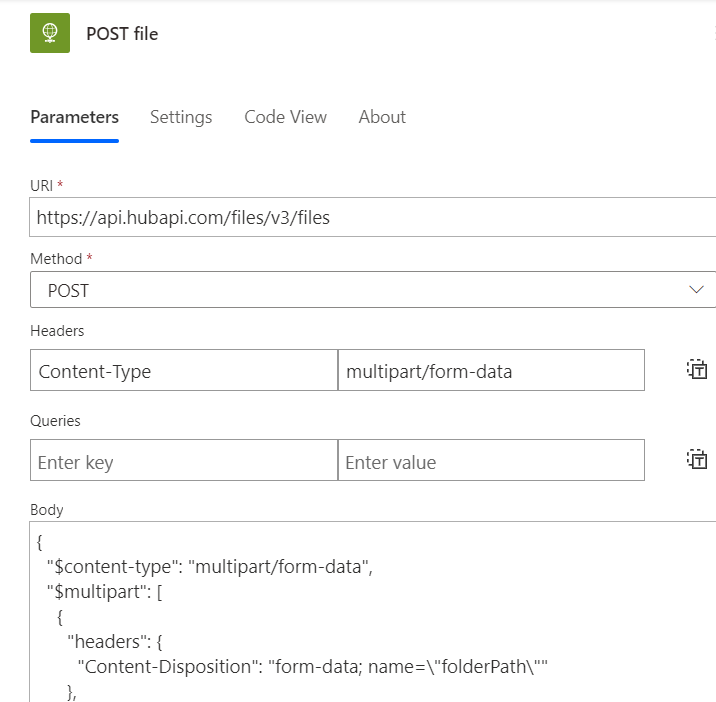
How to use HubSpot APIs
How to upload a file to HubSpot
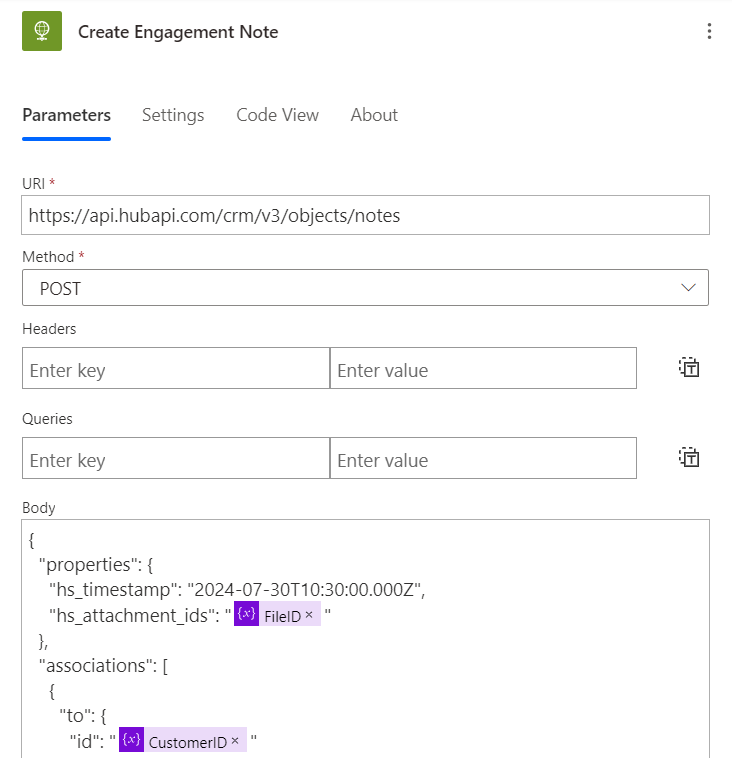
How to make association between a Contact and the uploaded file
How to achieve all of these using Power Automate
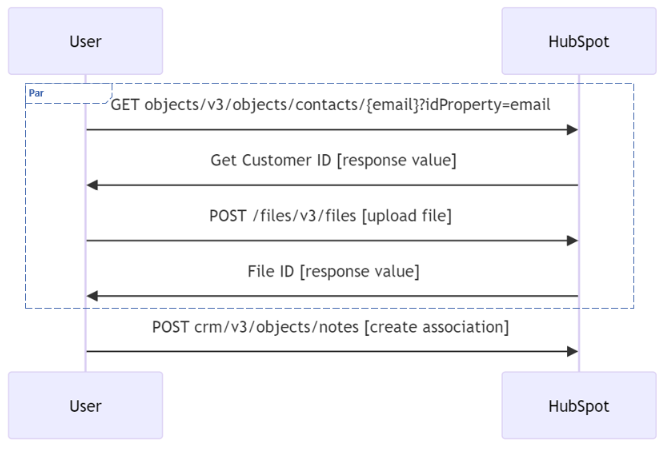
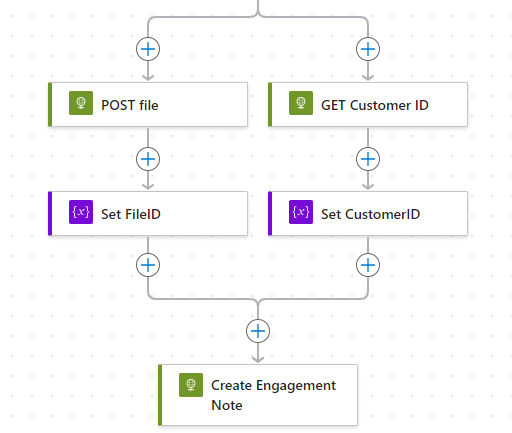
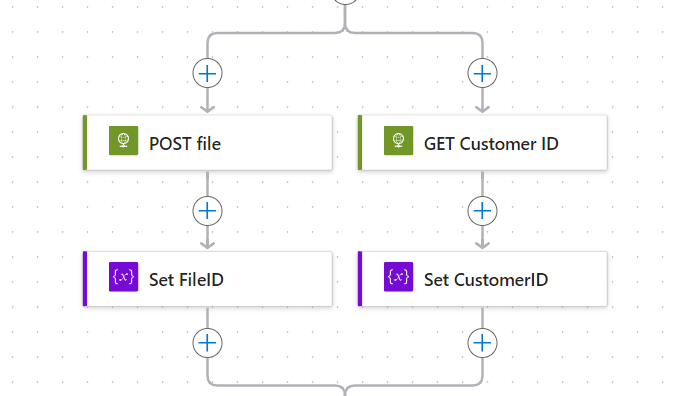
On a high level, below is the list of API tasks we have to do to achieve this. We have to make requests to three calls (one less if you have Customer ID already).
High level Power Automate flow
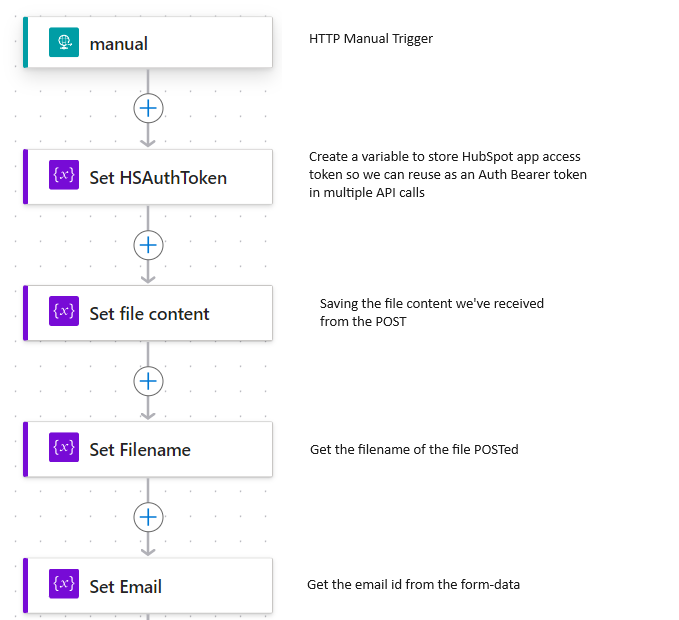
See below the high level flow I have created to demonstrate:
Prerequisites
Basic knowledge in HubSpot. We would be interacting the CRM Contacts and Library
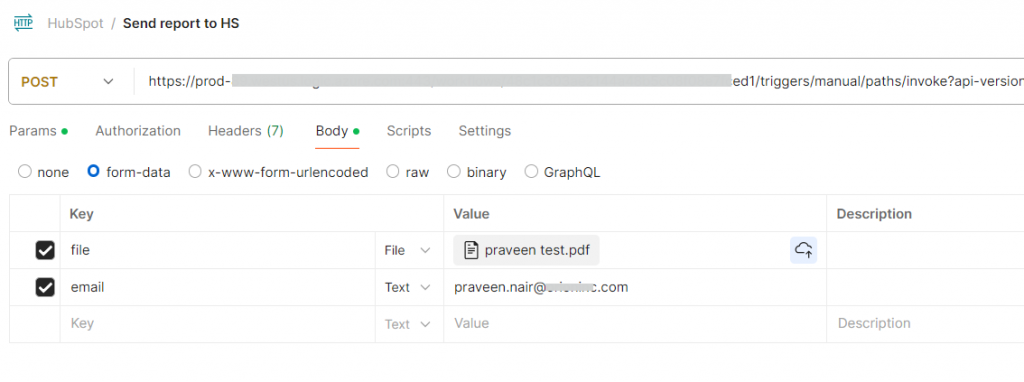
In this example, I am using a HTTP Request Trigger, which starts when we POST a file and a email-id (I used it to represent a customer in HubSpot contact form). I am doing some
Set the stage
For those struggling to get few items from the POST’ed content, find below details for your reference.
Using Postman to trigger a Power Automate HTTP flow
A. Get File content
triggerOutputs()['body']['$multipart'][0]['body']
B. Get filename
Honestly, I am not sure if there is a straight forward method available. This is my way of parsing filename from the Content-Disposition string:
// Input sample: "headers": {
//        "Content-Disposition": "form-data; name=\"email\"",
//        "Content-Length": "25"
//      }

// Power fx
trim(concat(split(split(triggerOutputs()['body']['$multipart'][0]['headers']['Content-Disposition'], 'filename="')[1], '"')[0]))
Note: associationTypeId is the magic number which tells the API to make Contact-File association. Please check the documentation for more association types.
Find the Power Automate action view:
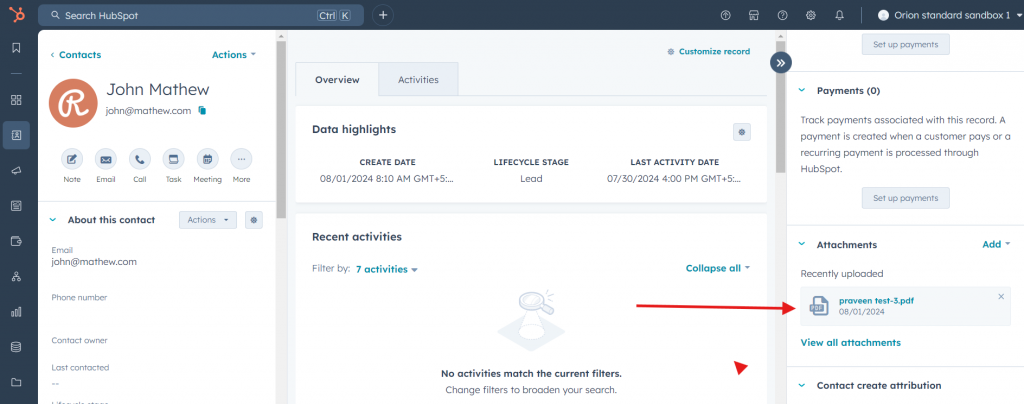
Verify if the flow has worked
Go to HubSpot, select contact and you should be able to see the file attached.
Additionally, if you go to the Library -> Files -> Sample Folder, you can see the same file appearing there.